
C# Studying
This post is for my C# studying.
1. Variables and Data Types
What is a variable?
A variable is a named space in memory that stores a value. In C#, every variable must have a type, which determines:
- how much memory it uses
- what kind of values it can store
Value Types
Common value types include:
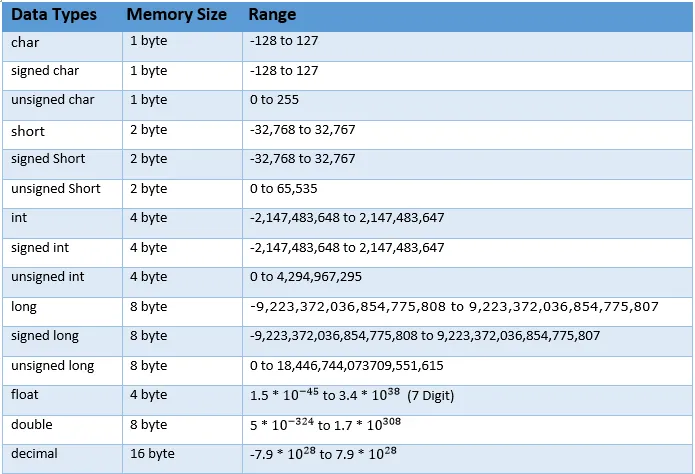
Example:
int level = 100;float speed = 3.14f;bool isActive = true;char grade = 'A';Key point:
The type decides what operations are allowed.
You cannot treat an int like a bool, even if the value “looks similar”.
Variable Initialization
Variables can be:
- initialized immediately
- declared first, assigned later
Example:
int a1, a2, a3;a1 = 10;
int b = 20;If you forget to initialize, the compiler will usually stop you. This is intentional: C# avoids “garbage values”.
2. Operators
Arithmetic Operators
From the operator lecture :
+addition-subtraction*multiplication/division%remainder
Example:
int num1 = 5;int num2 = 2;
int sum = num1 + num2; // 7int mod = num1 % num2; // 1Division and Casting
If both operands are integers, integer division happens.
int a = 5;int b = 2;float result = a / b; // result = 2 (not 2.5)Correct way:
float result = (float)a / b; // 2.53. Conditional Statements
if / else
Conditionals allow the program to choose a path.
int num = 11;
if (num > 10){ Debug.Log("num is greater than 10");}else{ Debug.Log("num is 10 or less");}Conditions must evaluate to bool.
Logical Operators
&&AND||OR
Example:
if (num > 0 && num < 20){ Debug.Log("num is between 1 and 19");}Important detail: C# uses short-circuit evaluation. The second condition may not be evaluated if the first already determines the result.
switch and enum
Used when states are discrete and named.
enum STATE{ NONE = 0, INIT, //1 PLAY = 100, //100 OVER, //101
}
private int num = 0; private STATE currentState = STATE.INIT;
switch(num){ case 100: { Debug.Log("switch 100"); } break; case 90: { Debug.Log("switch 90"); } break; default: Debug.Log("switch default"); break;}This appears in the later control-flow section.
4. Loops
for loop
Used when the number of iterations is known.
for (int i = 0; i < 5; i++){ Debug.Log(i); // 0 1 2 3 4}while / do-while
Used when the stopping condition is more important than the count.
Key difference:
whilechecks firstdo-whileruns at least once
int num1 = 0;while (num1 < 10){ Console.WriteLine(num1); num1++;}
int num2 = 0;do{ Console.WriteLine(num2); num2++;}while (num2 < 5);break and continue
for (int i = 0; i < 10; i++){ if (i % 2 == 0) continue; if (i > 8) break; Debug.Log(i);}5. Arrays
Why arrays exist
Arrays store multiple values of the same type in one structure.
int[] scores = { 90, 70, 50 };Access by index:
scores[0]; // 90Looping is almost always required:
for (int i = 0; i < scores.Length; i++){ Debug.Log(scores[i]);}2D Arrays
Used when data has rows and columns.
int[,] grid = new int[2, 3];Access:
grid[0, 1];6. Methods (Functions)
Why methods matter
Methods:
- reduce duplication
- make code readable
- isolate logic
Important rule: A method should do one thing. If it does more, it probably should be split.
Example
void Print(){ Debug.Log("Hello World");}
int MaxInt(){ return int.MaxValue;}
long Sum(int a, int b){ return a + b;}