Understanding the Basics
ROS (Robot Operating System)
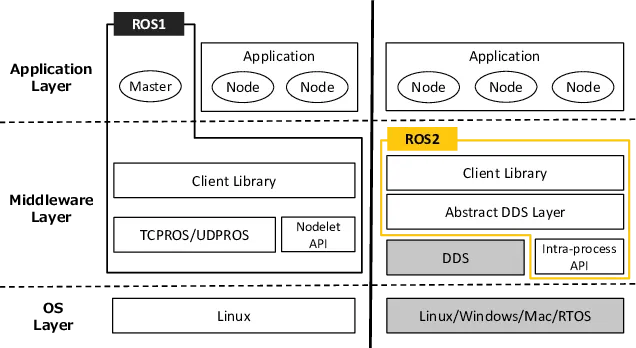
ROS2 is essentially a collection of software libraries and tools designed to streamline robot development. It provides the building blocks for communication, control, and simulation so that each component of a robot can remain modular and independent. While ROS1 already established this architecture, ROS2 pushes things further by adopting DDS (Data Distribution Service), resulting in better performance, improved reliability, and true distributed communication across a network.
Node
 A node is the smallest unit of computation in ROS2. Each node has a clear, single responsibility—whether that’s reading sensor data, processing images, or issuing motor commands. Nodes communicate with each other through standardized interfaces, which is what allows us to scale from a toy simulation to a complex robot without rewriting the entire system.
Topic
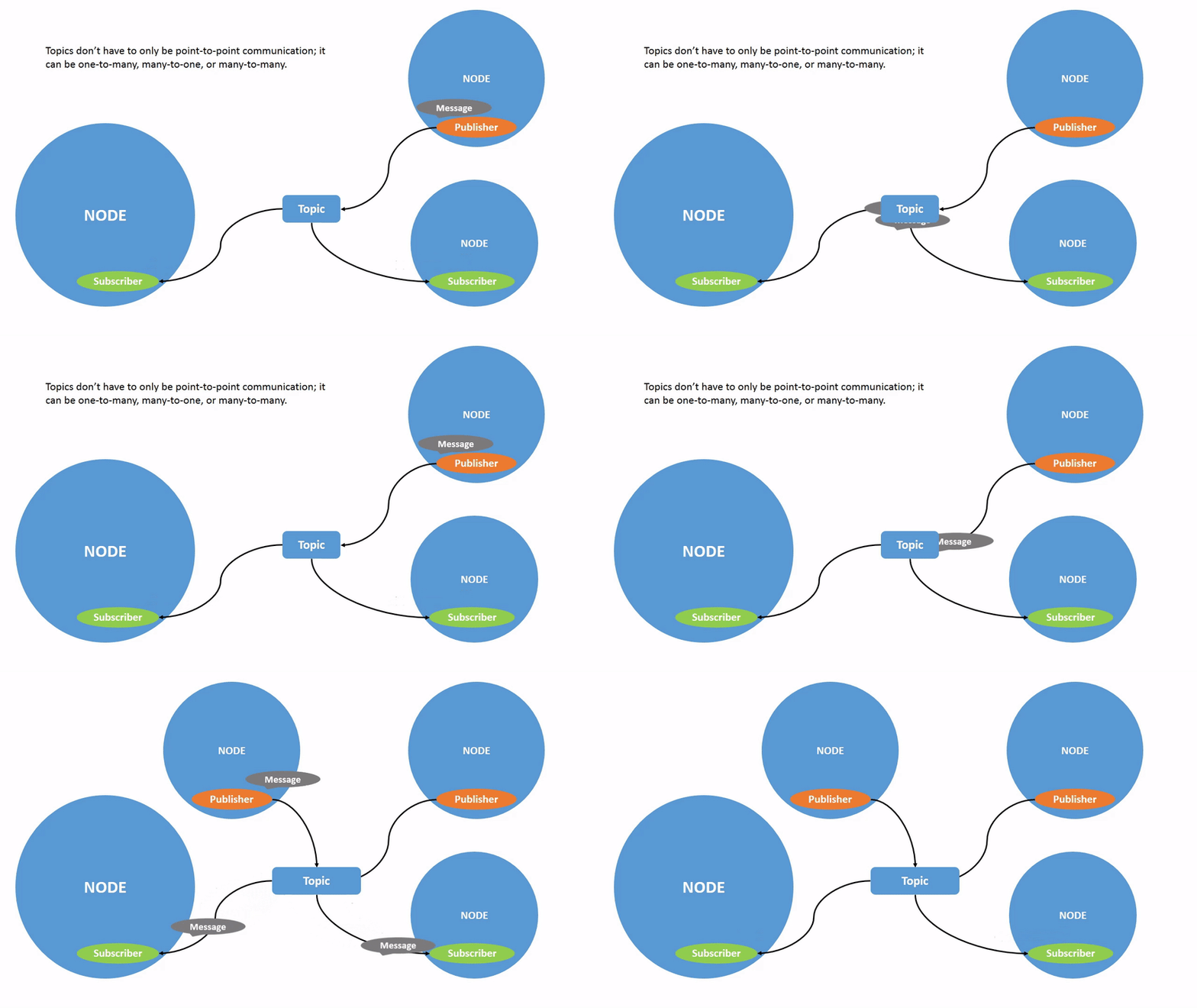 Topics are the primary data channels between nodes. They support 1
Parameter
Parameters are configurable values stored inside a node. They allow runtime tuning without code changes—for example, adjusting a robot’s speed limit or sensor thresholds. While they seem simple, parameters are surprisingly powerful when combined with launch files and dynamic updates.
Service
 A service provides a synchronous, request–response communication pattern. Since calls are deterministic and 1:1, services work best for short operations such as resetting a simulation, querying a map, or changing a mode. Services use
 .srv files to define their request and response format.
Action
 Actions extend the idea of services by supporting long-running tasks with continuous feedback. Navigation is a typical example: you send a goal, receive progress updates, and eventually get a result. The
 .action file describes this three-part structure.
Interface
ROS2 defines three file types for communication:
.msg→ basic message structures.srv→ service (request/response).action→ long-running actions with feedback
These interfaces ensure consistent communication across nodes, packages, and even different programming languages.
Launch
Launch files are one of the major conveniences in ROS2. Instead of manually running dozens of commands, you can start entire systems—nodes, parameters, remappings, and environment configuration—through a single Python-based launch file. As projects grow, launch files become essential for keeping everything organized.
Composition
Node composition lets multiple nodes run inside a single process. This significantly reduces overhead and improves performance, especially for systems with high-frequency communication. It’s one of those features that doesn’t seem necessary at first, but becomes valuable when optimizing for real robots.
Executor
Executors determine how callbacks are processed:
- Single-threaded executor — each callback runs sequentially
- Multi-threaded executor — callbacks may run in parallel
Understanding executors is important for writing predictable, real-time-safe behavior.
Materials
To follow most ROS2 tutorials comfortably, the following setup works best:
- Ubuntu 22.04
- Official ROS2 Humble Docs
- YouTube video tutorials
- Visual Studio Code (C++ / Python)
- Additional tools:
- Turtlesim for basic concepts
- Gazebo for simulation
- RViz 2 for visualization
Materials
- Ubuntu 22.04
- Official ROS2 Humble Docs
- Yutube Videos
- Visual Studio (C++ / Python)
- Additional Tools
- Turtlesim
- Gazebo (Sim)
- RViz 2
Tutorials
Beginner: CLI Tools
Before writing any code, ROS2 encourages you to explore the ecosystem through the command line. This stage is surprisingly valuable because it forces you to understand how nodes, topics, services, and actions behave in a real running system.
What you learn here
- Inspecting active nodes with
ros2 node list - Checking published and subscribed topics with
ros2 topic list - Echoing data streams using
ros2 topic echo - Calling services directly through CLI
- Visualizing architecture using
rqt_graph - Basic debugging with
ros2 doctorandros2 info
Most developers (including me) underestimate this step, but these CLI tools become indispensable once you’re debugging large multi-node systems.
Beginner: Client Libraries (Python & C++)
Once you get familiar with how ROS2 works under the hood, the next step is building your own packages. This is where colcon and the workspace structure start making sense. You create a src/ folder, add packages, write nodes, and build everything in a clean, modular layout.
Core Topics
1. Creating Packages
You learn to generate packages using:
ros2 pkg create my_pkg --build-type ament_cmakeor Python packages via:
ros2 pkg create my_pkg --build-type ament_pythonThis automatically sets up the directory structure, package.xml, and build files.
2. Publisher & Subscriber
This is the “Hello World” of ROS2 development. Writing a minimal pub/sub pair teaches you:
- message imports
- QoS (Quality of Service) basics
- callback structures
- timers
It’s simple, but it becomes the foundation for almost every robotics system.
3. Services & Clients
Here you write synchronous communication in both languages. You define .srv files, build interfaces, and implement request–response handlers.
4. Custom Interfaces
You define your own .msg and .srv structures.
This part forces you to think about architecture instead of dumping arbitrary data.
5. Parameters
ROS2’s parameter system allows you to:
- load parameters from YAML
- override them via CLI
- declare dynamic parameters
- handle parameter callbacks
This becomes extremely useful in launch files and tuning algorithms.
Intermediate: Advancing with ROS2
This stage covers the actual building blocks that real robots rely on. It’s where everything you learned starts connecting, and where the architecture begins to feel more intentional.
Working With Dependencies
Before building any ROS2 package, you need dependency resolution.
rosdep handles this by scanning package.xml and installing missing system libs.
rosdep install --from-paths src -y --ignore-srcIt looks like a minor detail, but forgetting this step is responsible for 80% of beginner build failures.
Actions
Actions take services to the next level. You define .action files with:
- Goal
- Result
- Feedback
Then you implement action servers and clients in both Python and C++. Navigation stacks and manipulation frameworks rely heavily on actions.
Composable Nodes
One of the most powerful features in ROS2. Instead of launching each node as a separate process, you load multiple nodes into a single shared process.
Why it matters:
- lower latency (no process-to-process overhead)
- reduced memory consumption
- faster communication
Composable nodes make a huge difference in real robot performance.
Node Interfaces & Dynamic Parameters
This covers more advanced techniques like:
- introspecting node interfaces
- reacting to parameter updates
- using templates and advanced C++ patterns
It helps you understand how nodes should behave in large-scale systems.
Launch Files (Python / XML)
Launch files become more complex here:
- multiple nodes
- namespaces
- remapping
- events and lifecycle management
- conditional execution
- passing parameters to nodes automatically
You essentially design how your entire robotics system boots up.
TF2 (Transforms)
TF2 is the coordinate transform system of ROS2. Every robot with physical movement uses it.
You learn:
- broadcasting transforms
- listening and chaining transforms
- using TF buffers
- visualizing frames in RViz
Understanding TF2 is crucial for anything involving sensors or movement.
Testing (Unit & Integration)
ROS2 has built-in testing through:
- GTest for C++
- pytest for Python
launch_testingfor integration tests
Testing robotic systems might feel optional, but once you run a multi-node stack, automated tests save hours of debugging.
Robot Modeling (URDF) & Visualization
URDF (Unified Robot Description Format) is used to model robot links and joints. You visualize it in RViz and integrate it with Gazebo simulation.
This is the point where your ROS2 knowledge becomes tangible—you can visualize your own robot moving, even before a physical prototype exists.
Debugging Notes
Some common issues that appear while building ROS2 projects:
- Missing dependencies (fix with
rosdep install) - Incorrect package paths
- Misconfigured CMakeLists or package.xml
- Build failures due to unsaved files (surprisingly common)
- Gazebo version conflicts
- RViz plugin issues
- Wrong QoS causing subscriber to receive no messages
Debugging ROS2 is an ongoing skill, not a one-time lesson.